SafeChild
Flutter developer — safety features & real-time UX
What it is
SafeChild lets parents and kids stay connected without the app feeling like surveillance software: safe zones on a map, daily and weekly battery and location reports, in-app messaging, and an AI advisor parents can actually ask questions to. It was my graduation capstone, built with a teammate over two semesters, and defended with an A+.
My role
I owned the safety and real-time UX side of the Flutter app: geofencing, background location tracking, push notifications, secure local storage, and the parent-child chat experience.
Technical highlights
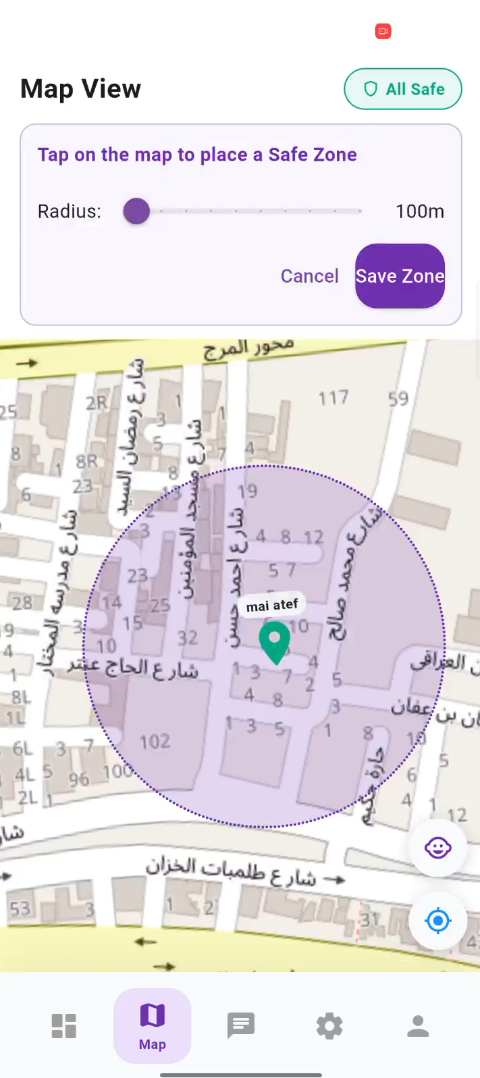
Dual-tier geofencing
Built breach detection using the Haversine formula with two alert tiers, so a parent gets a gentle heads-up before a hard breach alert — not just a binary in/out zone flag.
Real-time chat
Implemented parent-child messaging over WebSocket with STOMP, including handling reconnects and keeping message state consistent when the app moves to the background.
Background location, reliably
Used WorkManager to keep location and battery reporting running even when the app is killed or the phone restarts, without draining the battery it is meant to be protecting.
Typed error handling
Built a Dio interceptor layer with a typed exception hierarchy so network failures surface as specific, actionable states in the UI instead of generic error toasts.
AI advisor
A RAG-based assistant (FastAPI, ChromaDB, Gemini) that answers parenting and safety questions by searching real reference material instead of improvising.
Screenshots
The hard part
The hardest part was reliability, not features: background location on Android is fighting the OS's battery optimizations at every step. Getting WorkManager, FCM, and the geofencing logic to survive real-world conditions (app kills, doze mode, spotty connectivity) taught me more about production Android constraints than any course did.